
Audi Q5: Setting power locking
The driver can determine the functions for power locking in the radio or in the ММI.
- Select:
 function button > Central locking.
Or
- Select:
function button > Car systems
control button > Vehicle settings > (Central
locking).
Unlocking single door/Unlock doors - you can specify which doors unlock when you open the vehicle.
- Selecting Off/All and pressing the
 button on
the remote control key unlocks the entire vehicle.
button on
the remote control key unlocks the entire vehicle. - Selecting On/Driver and pressing the
button
on the remote control key once unlocks only the
driver's door. In vehicles with a convenience
key, only the door whose handle you pull will
unlock. If you press the
button twice, the entire
vehicle will unlock. If you press the
 button,
the entire vehicle will always lock.
button,
the entire vehicle will always lock.
Trunk lid/tailgate/Lock exterior trunk handle - if
you select On, the rear lid handle locks
> fig. 35. In this case, the rear lid can
be opened with the
 button on the master key
> fig. 29 or with the
button in the
driver's door > fig. 34.
button on the master key
> fig. 29 or with the
button in the
driver's door > fig. 34.
Fold mirrors - if you select On, the outside mirrors
will fold in automatically when you press the
button on the remote control key.
Confirmation tone/Tone when locking - if you select On, a tone will sound when you lock the vehicle.
Unlocking and locking the vehicle with the remote control
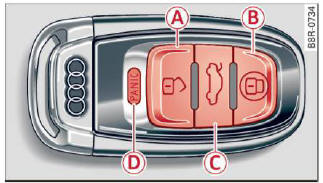
Fig. 29 Remote control: function buttons
Either the driver's door only or the entire vehicle will unlock when the unlock button A is pressed once, depending on the settings in the radio or MMI Central locking menu.
- Press button
 (A) to unlock the vehicle
> fig. 29.
(A) to unlock the vehicle
> fig. 29. - Press button
 (B) to lock the vehicle.
 - Press the button
 (C) for at least one second
to open the rear lid.
(C) for at least one second
to open the rear lid. - Push the red
 button (D) to activate the
panic function. The horn sounds and the turn
signals flash. Push the red
button again
to deactivate the panic function.
button (D) to activate the
panic function. The horn sounds and the turn
signals flash. Push the red
button again
to deactivate the panic function.
If the vehicle is unlocked and no door, the rear lid or the hood is opened within 60 seconds, the vehicle locks itself again automatically. This feature prevents the vehicle from being accidentally left unlocked over a long period of time.
It depends on the settings in the radio or in the MMI whether the entire vehicle is unlocked or only certain doors.
On vehicles with Convenience key, the selector lever must be in the P position, otherwise the vehicle cannot be locked.
WARNING
Read and follow all WARNINGS.
Tips
- In order to make sure the locking function is working, you should always keep your eye on the vehicle to make sure it is properly locked.
- Do not use the remote control if you are inside
the car, otherwise you may unintentionally
lock the vehicle, and then you would set
off the anti-theft alarm when you try to
start the engine or open a door. In case this
happens anyhow, push the unlock button .
- Use the panic function only if you are in an emergency situation.

