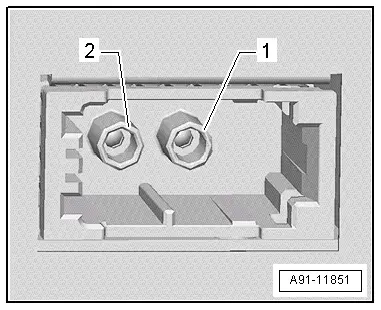
Audi Q5: Bluetooth Car Phone Connector Assignment
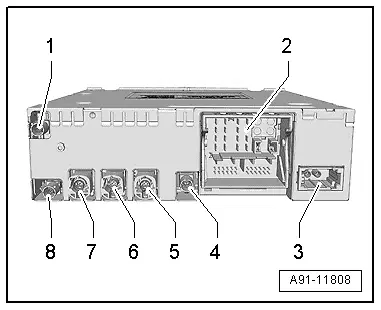
Information Electronics Control Module 1 -J794-
1 - Antenna Connection (GSM) from the Roof Antenna -R216-
2 - Connection block with four multipin connectors
3 - MOST Bus
4 - Not Assigned
5 - 4-pin connector (T4am) for the Front Information Display Control Head -J685-
6 - 4-pin connector (T4ap) to External Audio Source Connection -R199-
7 - Not Assigned
8 - Not Assigned
 Note
Note
Unlisted connector terminals are not assigned.
2 - Connection block with four multipin connectors
A - Brown 8-pin connector (T8ah)
1 - Not Assigned
2 - Power Supply to Multimedia System Control Head -E380-
3 - Wake UP to Multimedia System Control Head -E380-
4 - Not Assigned
5 - Not Assigned
6 - Reset to the Multimedia System Control Head -E380-
7 - Ring-break Diagnostic Cable
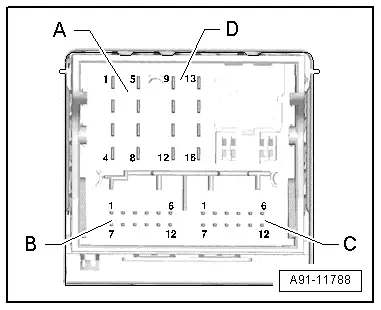
B - Blue 12-pin connector (T12x)
8 - Microphone IN (+) for the Microphone Unit in Front Roof Module -R164- (Left Front Microphone -R140-)
9 - Microphone IN (-) for the Microphone Unit in Front Roof Module -R164- (Left Front Microphone -R140-)
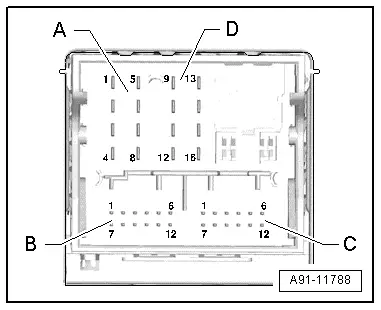
C - Green 12-pin connector (T12y)
All pins are connected to the External Audio Source Connection -R199-.
1 - LF-In ground
2 - Right LF-In
3 - USB (+5V)
4 - USB (ground)
5 - Not Assigned
6 - Detect
7 - Left LF-In
8 - LF-In ground shielding
9 - CVBS cable (+)
10 - CVBS cable (-)
11 - iPod data
12 - iPod data
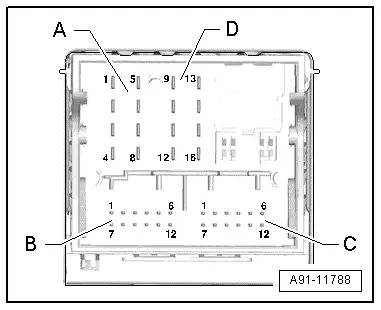
D - Black 8-pin connector (T16q)
9 - Switch-on signal to Telephone Baseplate -R126-
10 - Data from Multimedia System Control Head -E380-
11 - Data to the Multimedia System Control Head -E380-
12 - Terminal 31
14 - Reset from Multimedia System Control Head -E380-
15 - Terminal 30
16 - Ground to Multimedia System Control Head -E380-
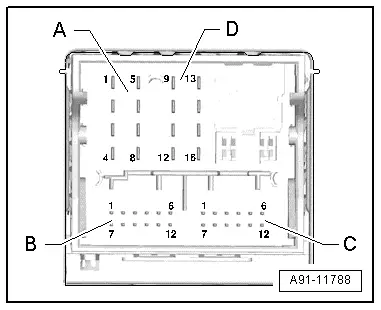
3 - MOST Bus
1 - Input
2 - Output