Audi Q5: In curves
Applies to vehicles: with Audi adaptive cruise control
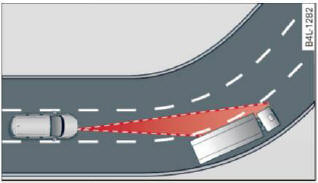
Fig. 117 Example: driving into a curve
When driving into a curve > fig. 117 and out of a
curve, the adaptive cruise control may react to a
vehicle in the next lane and apply the brakes. You
can override or prevent the braking by pressing
the accelerator pedal briefly.
Stationary objects
Applies to vehicles: with Audi adaptive cruise control
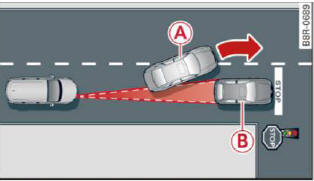
Fig. 118 Example: object changing lanes and stationary
object
The adaptive cruise control system only reacts to
objects that are moving or that the system has
already detected as moving. For example, if a vehicle
A, which has already been detected by the
adaptive cruise control, turns or changes lanes
and another stationary vehicle B is located in
front of that vehicle, the system will not react to
the stationary vehicle.
READ NEXT:
Description
Applies to vehicles: with Audi adaptive cruise control
Fig. 119 Detection range
What can adaptive cruise control do?
The adaptive cruise control works in conjunction
with a radar sensor i
Applies to vehicles: with Audi adaptive cruise control
Fig. 120 Selector lever: switching on/off
Fig. 121 Instrument cluster: adaptive cruise control
You can set any speed between 20 mph and
95 mph
Applies to vehicles: with Audi adaptive cruise control
Fig. 122 Selector lever: changing the speed
To increase or reduce the speed in increments,
tap the lever up or down.
To increase or reduce t
SEE MORE:
Removing
- Press the outer door seal to the side and remove the cover
over the hole -arrow A-.
- Remove the clamping screw -4-
all the way using a screwdriver -1-.
- Press the lock cylinder retaining bracket
-3- toward the inside.
- Remove the lock cylinder -2-
from the mounti
Peened triple roller joint AAR 2600 i with 88 mm outer CV
joint
Peened triple roller joint AAR 3300 i with 100 mm outer CV
joint
1 - Clamp
Always replace if removed
For tensioning. Refer to
→ Chapter "Clamp on Triple Roller Joint and Outer Joint, Tensioning".
2 - P