
Audi Q5: Setting the distance
Applies to vehicles: with Audi adaptive cruise control
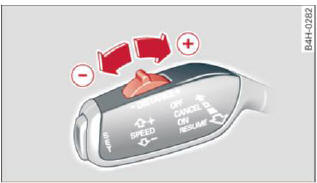
Fig. 124 Selector lever: setting the distance
- Tap the switch to display the current set distance > fig. 124.
- To increase or reduce the distance by increments,
tap the switch again to the left or right.
The distance between the two vehicles will change in the instrument cluster display.
When approaching a moving vehicle up ahead, the adaptive cruise control system brakes to match that object's speed and then maintains the stored distance. If the vehicle ahead accelerates, adaptive cruise control will also accelerate up to the stored speed.
The higher the speed, the greater the distance in yards (meters). The Distance 3 setting is recommended.
The distances provided are specified values. Depending on the driving situation and the how the vehicle ahead is driving, the actual distance may be more or Less than these target distances.
The various symbols for the time increments appear briefly in the information line D > fig. 121 when you change the settings.
.png) Distance 1: This setting
corresponds
to a distance of 92 feet/28 meters when traveling
at 62 mph (100 km/h), or a time interval of 1
second.
Distance 1: This setting
corresponds
to a distance of 92 feet/28 meters when traveling
at 62 mph (100 km/h), or a time interval of 1
second.
Distance 2: This setting
corresponds
to a distance of 118 feet/36 meters when traveling
at 62 mph (100 km/h), or a time interval of
1.3 seconds.
Distance 3: This setting
corresponds to a distance of 164 feet/50 meters when traveling
at 62 mph (100 km/h), or a time interval of
1,8 seconds.
Distance 4: This setting
corresponds to a distance of 210 feet/64 meters when traveling
at 62 mph (100 km/h), or a time interval of
2.3 seconds.
WARNING
Following other vehicles too closely increases the risk of collisions and serious personal injury.
- Setting short distances to the traffic ahead reduces the time and distance available to bring your vehicle to a safe stop and makes it even more necessary to pay close attention to traffic.
- Always obey applicable traffic laws, use good judgment, and select a safe following distance for the traffic, road and weather conditions.
Tips
- Distance 3 is set automatically each time you switch the ignition on.
- Your standard settings are automatically stored and assigned to the remote control key being used.

