
Audi Q5: Efficiency program
Description
Applies to vehicles: with efficiency program
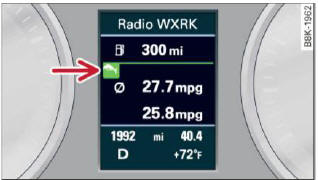
Fig. 18 Display: efficiency program
- Press the [RESET] button B > fig. 17 repeatedly until the efficiency program appears in the display.
The efficiency program can help you to use less fuel. It evaluates driving information in reference to fuel consumption and shows other equipment influencing consumption. Fuel economy messages provide tips for efficient driving.
The efficiency program uses distance and consumption data from trip computer 1. If the data are deleted in the efficiency program, those values are also reset in trip computer 1.
Other equipment
Applies to vehicles: with efficiency program
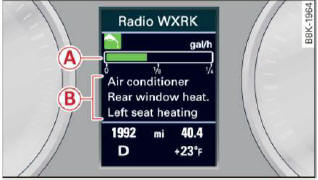
Fig. 19 Display: other equipment
- In the efficiency program, press the function selection switch > fig. 17 A repeatedly until the other equipment appears in the display.
Other equipment that is currently affecting fuel consumption is listed in the efficiency program. The display shows up to three other items of equipment B. The equipment using the most fuel is listed first. If more than three items using fuel are switched on, the equipment that is currently using the most fuel is displayed.
A scale A also shows the current total consumption of all other equipment.
Fuel economy messages
Applies to vehicles: with efficiency program
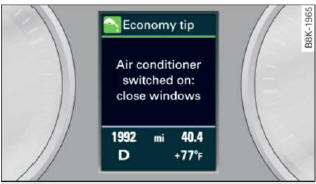
Fig. 20 Display: fuel economy message
Fuel economy messages are displayed when fuel consumption is increased by certain conditions. If you follow these fuel economy messages, you can reduce your vehicle's consumption of fuel. The messages appear automatically and are only displayed in the efficiency program. The fuel economy messages turn off automatically after a certain period of time.
- To turn a fuel economy message off immediately after it appears, press the [reset] button > fig. 17 B, or
- Press the function selection switch > fig 17 A.
Tips
- Once you have turned a fuel economy message off, it will only appear again after you turn the ignition on again.
- The fuel economy messages are not displayed in every instance, but rather in intervals over a period of time.

