
Audi Q5: Garage door opener (HomeLink)
Description
Applies to vehicles: with garage door opener (HomeLink)
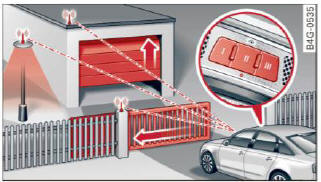
Fig. 43 Garage door opener: examples of using with different systems
You can activate various systems such as garage doors, security systems and home lighting from inside your vehicle using the garage door opener (HomeLink). There are three buttons for this in the vehicle headliner that can be in used in place of up to three hand-held transmitters.
To operate systems using the garage door opener, the three buttons in the roof headliner must be programmed first.
WARNING
Make sure no people or objects are in the immediate vicinity of the equipment when using or programming the garage door opener. People can be injured and objects can be damaged if they are caught in the equipment.
Tips
- For security reasons, we recommend that you clear the programmed buttons before selling the vehicle.
- For additional information about HomeLink, visit www.homelink.com.
- For Declaration of Compliance to United States FCC and Industry Canada regulations.
Operation
Applies to vehicles: with garage door opener (HomeLink)
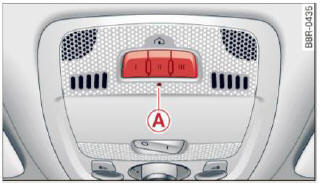
Fig. 44 Head liner: control unit
Requirement: The buttons in the roof headliner must be programmed or and the vehicle must be within range of the system, such as the garage door opener.
- Press the button to open the garage door. The LED (A) blinks or turns on.
- Press the button again to close the garage door.
Tips
To open or close the garage door, press the button, but do not hold it for longer than 10 seconds or the garage door opener module will switch to programming mode.
Programming the buttons (version A)
Applies to vehicles: with garage door opener (HomeLink)
You can program both fixed code and rolling code systems using this procedure.
Programming or reprogramming buttons
- Switch the ignition on.
- Press and hold the button in the roof headliner > fig. 44 that you would like to program for at least 10 seconds. Or
- Select:
 function button >
Car systems
control button > Vehicle settings > Garage
door opener > Program garage door opener. If
this path is not available, program the button
as described in version В.
function button >
Car systems
control button > Vehicle settings > Garage
door opener > Program garage door opener. If
this path is not available, program the button
as described in version В. - Follow the instructions in the MMI.
Erasing button programming
The programmed buttons cannot be erased individually.
They must all be erased together. Reprogram the buttons if necessary.
- Select: function button >
Car systems
control button > Vehicle settings > Garage
door opener > Clear program settings > Yes.
Displaying the version/status/country code
- Select: function button >
Car systems
control button > Vehicle settings > Garage
door opener > Version information.
Tips
- Programming through the MMI is not possible with all infotainment systems. If this is the case, program the buttons as described in version В.
- The required distance between the hand transmitter and the HomeLink module in the radiator grille > fig. 45 depends on the system that you are programming.
- Depending on the model of the system, you may need to release the button on the remote control during programming and press it again. Hold each position you try for at least 15 seconds before trying another position. Keep the turn signals on your vehicle in view when doing this.
- After programming the garage door opener, it may be necessary to synchronize the motor with the system. Refer to the manufacturer's instructions.
Programming the buttons (version B)
Applies to vehicles: with garage door opener (HomeLink)
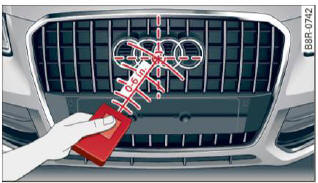
Fig. 45 Distance between the radiator grille and the hand
transmitter
Programming the button: Part 1 with the controls
1. Switch the ignition on.
2. Press and hold both outer buttons in the roof headliner > fig. 44 until the LED (A) turns off completely (after about 20 seconds).
This procedure clears the standard codes that were set at the factory and does not need to be repeated again to program the other buttons.
3. Briefly press the button on the roof headliner that you would like to program.
4. Wait until the LED (A) begins to blink quickly.
Programming mode is active for 5 minutes.
5. Move in front of your vehicle while holding the original remote control for the system that would like to program to a button in the roof headliner.
Programming the button: Part 2 at the radiator grille
6. Hold the remote control up to the radiator grille on your vehicle > fig. 45.
7. Press and hold the remote control until the turn signals on your vehicle blink. This may take up to 30 seconds.
8. If the emergency flashers blink three times, the programming was successful. If the emergency flashers only blink one time, the 5 minute time limit for the programming has ended or the programming was not successful.
Repeat the programming from the third step, or try changing the distance to the radiator grille.
9. If the garage door or other system does not open using the buttons in the roof headliner even though the programming was successful, the system may use a rolling code instead of a fixed code. Rolling code programming must be performed.
The other two buttons in the roof headliner can be programmed according to the instructions above. Begin with the third step.
Erasing button programming
The programmed buttons cannot be erased individually.
They must all be erased together. Reprogram the buttons if necessary.
- Switch the ignition on.
- Press and hold both outer buttons in the roof headliner until the LED A turns off completely (after about 20 seconds).
Reprogramming the buttons
- Switch the ignition on.
- To reprogram an individual button, press and hold the button until the LED A starts to flash quickly (after about 10 seconds). Release the button immediately. Programming mode is active for 5 minutes.
- Continue with the fifth step.
Tips
- Programming using the buttons in the roof headliner is not possible with all Infotainment systems. If this is the case, program the buttons as described in version A.
- The required distance between the hand transmitter and the HomeLink module in the radiator grille > fig. 45 depends on the system that you are programming.
- Depending on the model of the system, you may need to release the button on the remote control during programming and press it again. Hold each position you try for at least 15 seconds before trying another position. Keep the turn signals on your vehicle in view when doing this.

