
Audi Q5 Owners & Service Manuals

Audi Q5: Emergency unlocking of the luggage compartment lid

Audi Q5 Type 8R (2008 - 2017) Owner's Manual / Operation / Opening and closing / Emergency unlocking of the luggage compartment lid

The luggage compartment lid can be released in an emergency from the inside.
Opening and closing
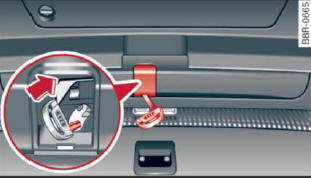
Fig. 38 Luggage compartment lid interior

The luggage compartment lid can be released in an emergency from inside the luggage compartment.

  • Remove the cover from the luggage compartment lid.
  • Press the lever in the direction of the arrow until the luggage compartment lid releases.

Child safety

Child safety locks in the rear doors

The child safety locks prevent the rear doors from opening from the inside.
Opening and closing
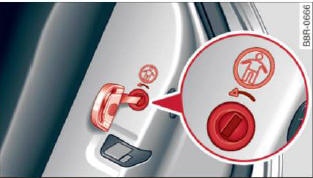
Fig. 39 Child safety locks on the rear doors

The rear doors are equipped with child safety locks. The lock is only visible when the door is open. Take the mechanical key out of the master key.

Switching the child safety locks on

  • Turn the key in the direction of the arrow > fig. 39.

Switching the child safety locks off

  • Turn the key in the opposite direction of the arrow.

When the child safety locks are activated, the inside door handles do not work and the doors can only be opened from the outside.

    READ NEXT:

     Power Windows

    Controls The driver can control all power windows. Fig. 40 Section of the driver's door: Controls All power window switches are provided with a two-position function: Opening the windows Press the

     Panorama sunroof

    Operation Applies to vehicles: with Panoramic sliding sunroof Fig. 42 Section from headliner: Knob for Panoramic sliding sunroof Tilting The sunroof can be tilted or closed only in switch position

     Garage door opener (HomeLink)

    Description Applies to vehicles: with garage door opener (HomeLink) Fig. 43 Garage door opener: examples of using with different systems You can activate various systems such as garage doors, securit

    SEE MORE:

     Selecting the driving mode

    Applies to vehicles: with Audi drive select You can choose between Comfort, Auto, Dynamic and Individual modes, Fig. 132 Center console: Control for drive select Fig. 133 MMI: Audi drive select To set the mode, press the button > fig. 132 multiple times until the desired mode is displaye

     Parking system plus with rearview camera

    Introduction Applies to vehicles: with Audi parking system plus with rearview camera Fig. 141 Parking mode 1: Backing into a parking space Fig. 142 Parking mode 2: parallel parking Vehicles with the Audi parking system plus with rearview camera are equipped with a rearview camera in addition to th

    © 2019-2025 Copyright www.audiq5.net